The risk is already there. It just isn’t in your CRM.
Connect the opportunity to the support, usage, billing, conversation, and engineering signals that can change the number. SixDegree turns them into one source-backed view of every account.
One question first. Read-only by default. Every answer linked to its evidence.
Forecast risk
Find commit and best-case deals carrying risk the opportunity record does not show.
CRM + support + usage + delivery
Renewal risk
Catch adoption, escalation, billing, and relationship changes while there is time to act.
CRM + success + product + billing
Revenue reconciliation
See where contracted ARR, billing, and product reality disagree without hiding the gap.
CRM + contracts + billing + usage
Every system knows part of the story.
The CRM knows the opportunity. Support knows the escalation. Product knows adoption. Billing knows what changed. Engineering knows what slipped.
SixDegree connects those observations to the accounts, opportunities, renewals, and owners they affect, while keeping the original source and time attached.
Source event
Revenue consequence
- Support escalation leads to Renewal risk
- Usage decline leads to Account risk
- Billing discrepancy leads to ARR risk
- Engineering delay leads to Pipeline risk
- Champion departure leads to Deal risk
The event can happen anywhere in the business. The revenue consequence belongs in the same picture.
Ask the questions your CRM can’t answer alone.
- Which commit deals carry risk outside the CRM?
Sources: Salesforce · Zendesk · Mixpanel · Gong
- Which healthy renewals have declining usage or unresolved escalations?
Sources: Salesforce · Gainsight · Mixpanel · Zendesk
- Where does contracted ARR disagree with billing?
Sources: Salesforce · Stripe
- What pipeline depends on engineering work that slipped?
Sources: Jira · Mixpanel · Salesforce
From disconnected records to one source-backed answer.
No migration. No CRM replacement. Start with the systems behind one revenue decision.
01
Connect the systems you already use
Start read-only with the CRM, support, product, billing, conversation, and engineering sources behind one revenue question.
02
Resolve the same account everywhere
SixDegree connects people, opportunities, tickets, invoices, usage, and work items to the real-world account they describe.
03
See risk with the source attached
Ask a question or monitor for changes. Every answer keeps the source and time behind it.
Meridian Systems
$1.2M renewal · 47 days remaining
CRM stage: Commit
Connected observations


 SalesforceCommit
 MixpanelUsage down 31%Risk signal
 Zendesk2 open P1sRisk signal
 JiraDelayed 18 daysRisk signal
Revenue risk detected outside CRM
CRM status remains Commit
The simplified view: SixDegree preserves what each system reported, then surfaces the revenue consequence without rewriting the CRM.
- Not a customer 360 project.
- Start with one forecast or renewal question, not a multi-quarter data program.
- Not warehouse data plus an LLM guess.
- Identity, relationships, source, and time are resolved before an answer is generated.
- Not CRM-only revenue intelligence.
- Support, usage, billing, conversations, and delivery can change the deal too.
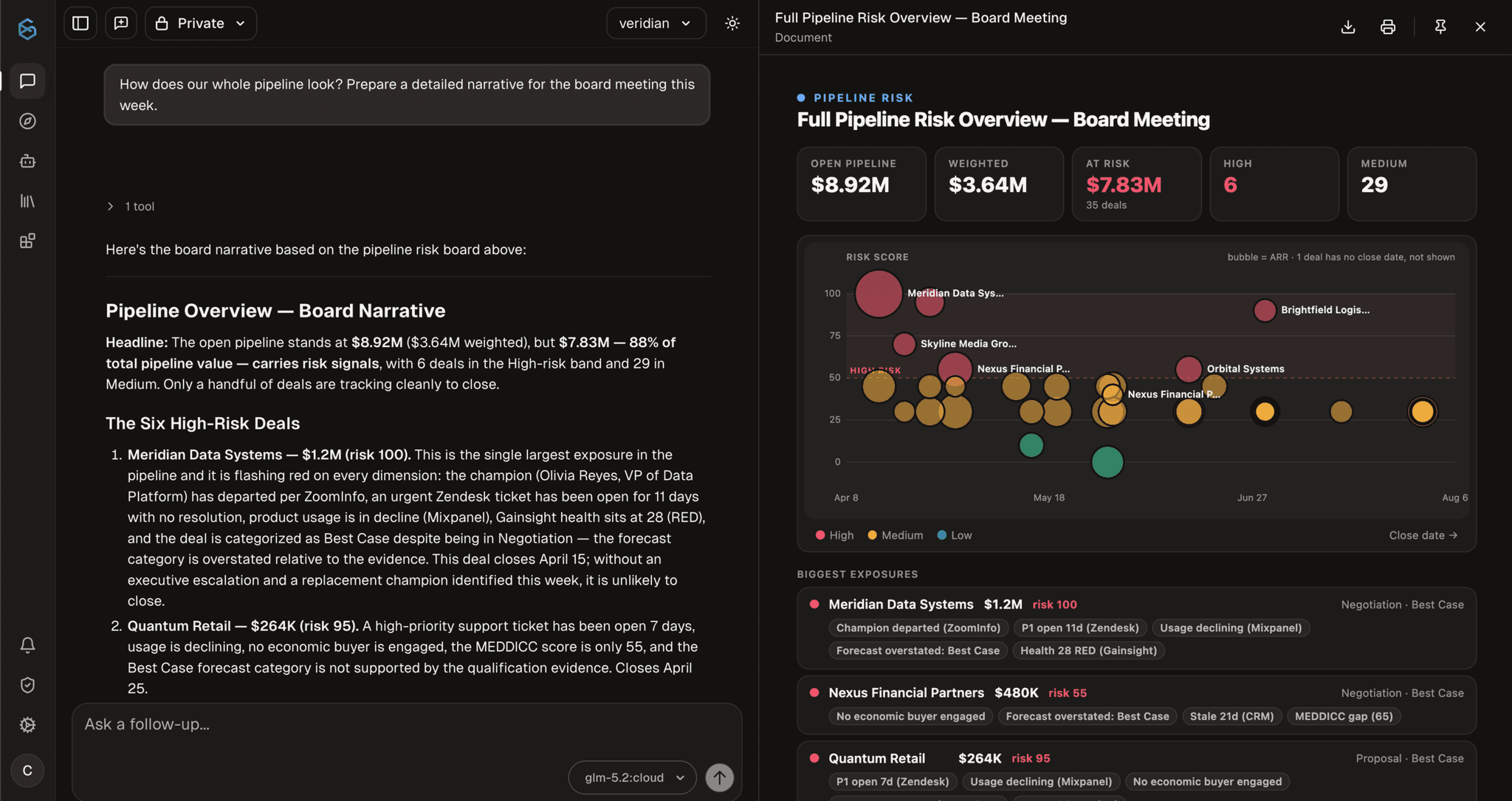
See the forecast the CRM cannot build alone.
Ask for the pipeline. Get the exposed deals, the value at risk, and the support, usage, relationship, and delivery records behind each one. Every answer shows what changed, when it changed, and which system reported it.
The original record
Open the ticket, invoice, conversation, usage event, or work item behind the claim.
The time it was true
Keep when each source observed the fact instead of flattening history into the latest value.
The disagreement intact
When two systems report different things, see both claims instead of an invented average.
Revenue is the first view of a much larger graph.
Revenue questions already cross customers, conversations, support, product, finance, and engineering. SixDegree resolves those shared entities and relationships once, then makes the source-backed evidence available to every authorized team and agent.
Start with the forecast and renewals. Expand without building another disconnected data project.
Existing systems
- CRM
- Support
- Product
- Billing
- Conversations
- Engineering
Resolved into one graph
SixDegree operational graph
- Entities
- Relationships
- Observations
- Provenance
Accounts, people, opportunities, products, issues, and invoices—resolved across the systems that describe them.
Available to authorized teams and agents
Teams and agents
- RevenueFirst application
- Support
- Operations
- AI agents
- Resolve once
- Records from different systems become shared operational entities and relationships.
- Preserve the evidence
- Every observation retains its source and can disagree with another source without being overwritten.
- Serve every authorized user and agent
- Teams and agents query the same graph inside their permitted access boundaries.
The first use case creates the foundation for the next one.
Start read-only. Expand when the evidence earns trust.
Connect the systems you choose without replacing them. SixDegree resolves their records into an operational graph while preserving where each observation came from and who is permitted to use it.
01Connect
Choose the systems and workflow.
Begin with the sources behind one revenue question, such as forecast risk, renewal health, or contracted ARR versus billing.
02Resolve
Build the operational graph.
SixDegree resolves records into shared entities and relationships while preserving each source observation and its provenance.
03Validate
Review the context with the team.
Start with read-only answers. Confirm that the graph reflects the accounts, opportunities, risks, and relationships your revenue team recognizes.
04Expand
Add monitoring and permitted actions.
Introduce agents, triggers, and write actions deliberately, inside explicit identity, scope, budget, approval, and audit boundaries.
Controls that apply at every stage
- Source provenance
- Every observation retains the system that reported it.
- Scoped access
- Each user or agent operates inside explicit access boundaries.
- Approval boundaries
- Write actions are enabled deliberately and higher-risk actions can require approval.
- Auditable activity
- Agent runs retain what was read, concluded, and acted on.
The graph can become more useful without becoming less controlled.
Bring us one revenue question your CRM can’t answer.
Choose a forecast, renewal, or revenue-reconciliation question. We’ll map the systems behind it and show how SixDegree resolves the accounts, signals, and relationships your CRM cannot see alone.
What we’ll cover
The question
Start with a revenue decision your team makes today.
The systems
Identify where the relevant account, product, support, billing, conversation, and engineering signals live.
The working session
Use a read-only product view to show the source-backed answer those systems make possible.