Catch renewal risk while the CRM still looks healthy.

Watch the signals customers create in support, product, billing, conversations, and delivery. Connect each change to the renewal, ARR, owner, and account it can affect.

Start read-only. Keep your existing systems. Trace every answer to its source.

Renewal risk starts before the renewal record changes.

The earliest warning signs are usually customer behavior and unresolved commitments, not a manually updated health field.

Separate evidence from the health score

A health score compresses many observations into one value. Keep the observations available: active users, licensed seats, unresolved severity, invoice state, executive engagement, champion coverage, and promised delivery dates.

When the score and the evidence disagree, show both. The disagreement is often the most important renewal signal.

Look for changes, not static thresholds

A customer with moderate usage may be stable. A previously active customer falling by 30 percent may be at risk. Direction, timing, and departure from the account’s own baseline are often more useful than a universal threshold.

Connect the change to renewal date and ARR so the team can prioritize exposure while there is time to act.

Route the reason with the account

A useful renewal-risk alert names the account, value, owner, signal, source record, observed time, and relationship to the renewal. A score without the reason creates another research task for the CSM.

Start read-only and validate the exceptions before automating playbooks or write actions.
How to identify at-risk customers before renewal

Most at-risk renewals show up in five places weeks before anyone edits the renewal record. The work is to watch those signals, pull them from the systems that hold them, and join each one to the renewal it threatens.

1. Watch the signals that move first

Product usage falling against the account’s own baseline, especially active users dropping below licensed seats. Unresolved P1 or P2 escalations, and repeat tickets on the same issue. Billing changes such as a seat reduction, a downgrade, a failed payment, or a disputed invoice.

Relationship loss: the champion changes jobs, the executive sponsor goes quiet, or meetings stop. Delivery slips on a feature or fix that was promised during the sale. Any one of these is a question. Two or more on the same account inside a renewal window is a risk.

2. Pull each signal from the system that owns it

Usage comes from product analytics such as Mixpanel or Amplitude. Escalations come from Zendesk or your support desk. Billing state comes from Stripe or your billing system. Relationship changes come from Gong, calendar activity, and CRM contacts. Delivery commitments come from Jira or your engineering tracker.

Renewal date, contracted ARR, stage, and owner come from Salesforce, HubSpot, or Gainsight. Do not copy these signals into a CRM field. Keep each one in its source, with the time it was observed, so you can check it later.

3. Join every signal to the renewal, not just the account name

The same customer is a Salesforce account, a Stripe customer, a Zendesk organization, and a product tenant. Resolve those records to one customer first, or the signals will never meet. Then order the at-risk list by renewal date and ARR, so the team works the largest exposure that still has time to recover.

Example: a green renewal that was not

An account renews in 75 days for $240,000 ARR, and the CRM health score is green. Over the last month product usage fell 31 percent, two P1 escalations are still open in Zendesk, and Gong shows the champion has moved to another company. No single system shows a problem. Joined to the renewal, they show the account is at risk.

The CSM gets the account, the renewal value, the three reasons, and a link to each source record. They have ten weeks to act instead of finding out at the renewal call.

Which renewals in the next 90 days have new risk?

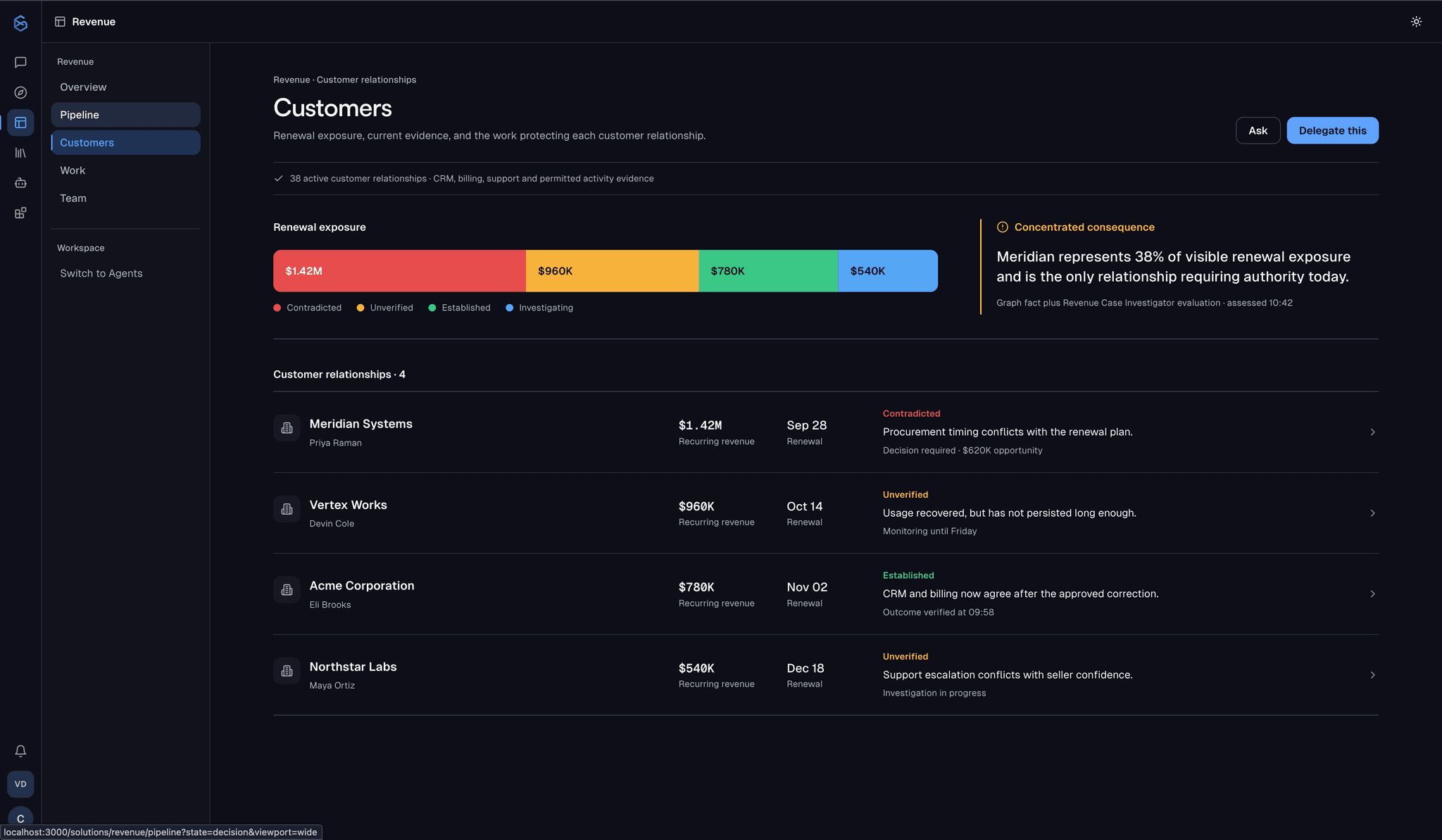
The result is a renewal list ordered by exposure, with the source record, observed time, and revenue connection behind every flag.

SixDegree customer relationships view showing renewal exposure by account, with Meridian Systems flagged as the concentrated risk requiring a decision
Source record
Inspect the record that supports each risk signal.
Observed time
See when the source reported it and what changed.
Revenue connection
Follow why that record affects this account, opportunity, renewal, or ARR.

The CRM is one signal, not the whole account.

Each system keeps owning what it knows. SixDegree connects the signal to the account, renewal, opportunity, ARR, and owner it can change.

Zendesk
Two unresolved P1 escalations
Customer impact is still active
Mixpanel
Usage down 31 percent
Adoption risk is increasing
Stripe
Billed value changed
Commercial state may have moved
Gong
Champion changed jobs
Renewal relationship lost coverage
Jira
Required capability delayed
Customer commitment is exposed

From source change to revenue action.

  1. 01

    Define the renewal book

    Read renewal dates, contracted ARR, stage, health, and ownership from the systems that maintain them.

  2. 02

    Watch customer-generated signals

    Monitor support, usage, billing, conversations, people, and delivery for changes tied to those accounts.

  3. 03

    Route the risk with evidence

    Give each owner the renewal, exposure, reason, and source while there is still time to respond.

Questions revenue teams ask

What are early renewal risk signals?
Falling usage, unresolved escalations, late or changed invoices, lost champions, reduced engagement, and slipped commitments often move before a CRM health or renewal field.
How does SixDegree connect signals to a renewal?
It resolves the account across CRM, support, product, billing, conversation, and engineering systems, then relates each source record to the same customer and renewal.
Does SixDegree overwrite CRM health scores?
No. Each system keeps its own claim. SixDegree preserves disagreement so teams can see why a CRM or customer-success score differs from current operational evidence.

Bring one revenue question your CRM cannot answer.

We’ll map the systems behind it and use a read-only working session to show what becomes visible when the account and its signals are connected.

Book a working session